Tutorial 3 of 5
Make a pixel sprite and a little loop
Beginner 7 min
Draw crisp pixels, work with a palette, import sprite sheets and export a transparent animation.
Start small
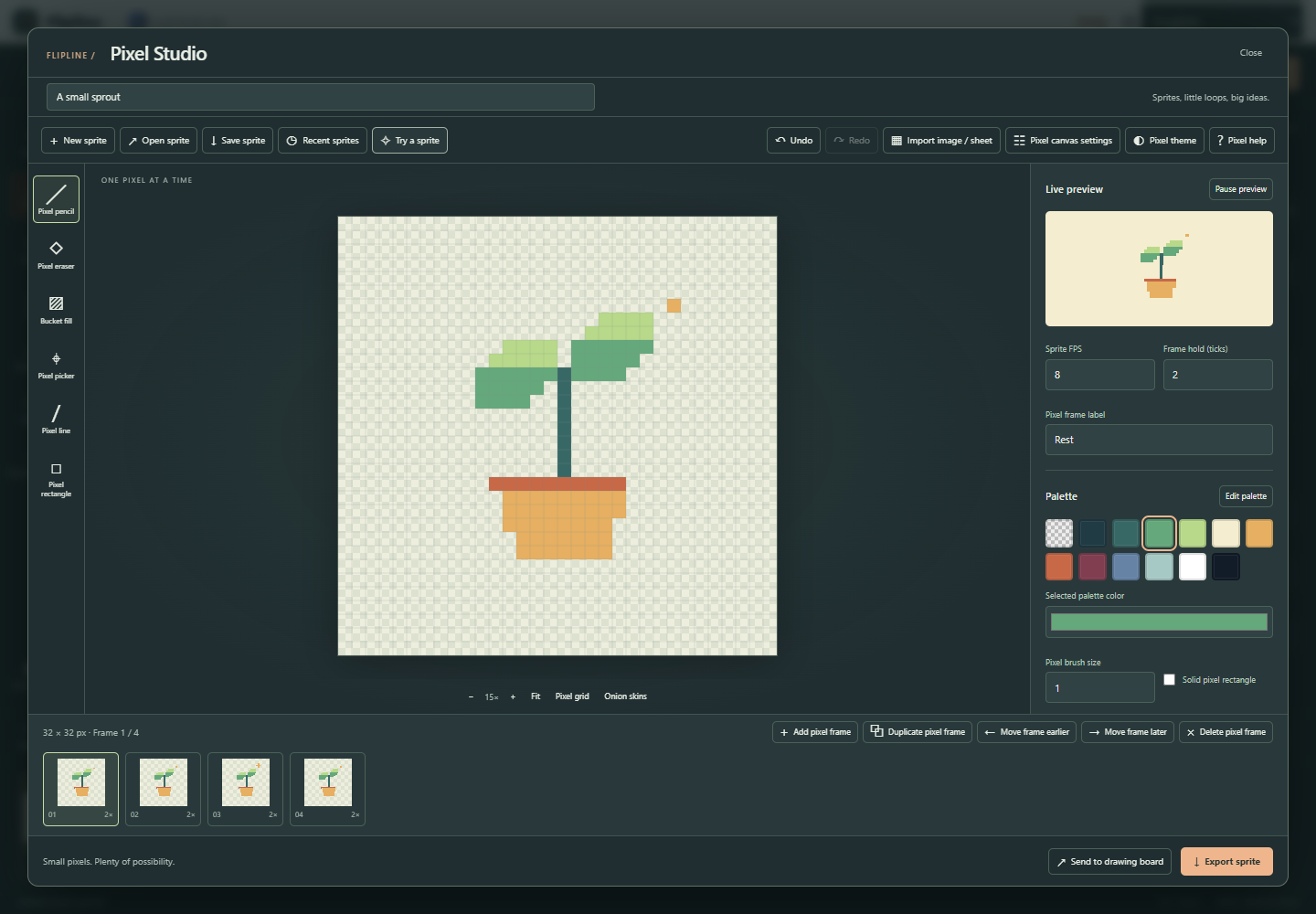
Open Pixel Studio from the Flipline drawing rail, or choose the pixel sprout example on the landing page. Try a sprite loads an original four-frame sprout. New sprite starts a canvas from 1 to 128 pixels per side. Pixel Studio keeps its own projects and recent list.
Draw one pixel at a time
Choose a palette color, then use Pixel pencil, Eraser, Line or Rectangle. Bucket fill changes a connected region of matching pixels on the current layer. Pixel picker samples the active cel. Transparent pixel selects index zero; it paints transparency. Pixel brush size ranges from one to eight pixels. Mirror left / right and Mirror top / bottom reflect brush marks around the canvas center. Solid pixel rectangle fills the rectangle interior.
Pixel grid follows each cell boundary. Use Fit or the zoom buttons to enlarge the canvas, and scroll to pan. Onion skins show the neighboring frames at low opacity. Arrow keys shift the current cel by one pixel, or eight with Shift; Wrap shifted pixels brings pixels back through the opposite edge.
Keep colors and layers editable
Select a swatch and change Selected palette color to recolor that palette slot everywhere. Edit palette accepts up to 32 six-digit HEX colors as a list, GIMP GPL or text JASC-PAL file, and downloads the palette in all three formats. Applying a different palette remaps all cels to the nearest RGB color, without dithering. Palette edits affect the entire sprite, including locked layers.
Add pixel layer separates foreground and background. The list is front to back; layer visibility, opacity and order control the composite. Lock pixel layer protects its pixel edits. Erasing a top layer reveals lower layers. Flip pixels acts on the active cel; Rotate pixel canvas 90° turns every frame and layer and swaps canvas dimensions. Unlock all layers before rotation or resizing.
Give it a little movement
Duplicate pixel frame, change a few pixels and watch Live preview. You can keep drawing while the preview loops. Each frame has its own hold in timeline ticks; Sprite FPS controls tick speed. Add blank frames, reorder them or remove a frame. Save sprite downloads an editable .flipline-pixels.json file. Local autosave and eight recent sprites help recovery; downloaded files are the durable backup. The main Open button also accepts pixel projects.
Bring in an image or sprite sheet
Import image / sheet accepts PNG, JPEG or WebP up to 4 MB and 2 MP. Single image resizes to the chosen frame dimensions using nearest-neighbor sampling. Sprite sheet reads exact uniform cells from left to right, then top to bottom. Set frame width, height, outer margin, gap and frame count. Extract a 16-color palette chooses frequent sampled colors; uncheck it to use your current palette. Alpha below 128 becomes transparent. Import replaces the current sprite and can be undone.
Export for sharing or a game
Export sprite offers current-frame PNG, animated GIF, PNG sequence ZIP, sprite-sheet ZIP with atlas JSON, SVG with embedded PNG and browser printing. Integer scale repeats each pixel without blur. PNG retains full alpha. Pixel GIF keeps exact palette colors and transparent pixels; opacity blends map back to the project palette, alpha becomes binary at 128, and holds round to 10 ms. Sheet padding is measured in exported pixels.
Send to drawing board creates rendered image marks for every frame and preserves holds, so you can add drawing-board marks. Save the pixel project first to keep the indexed layers editable.
A few shortcuts
B, E, F, I, L and R choose pencil, eraser, fill, picker, line and rectangle. Ctrl+C / V copies and pastes the active cel; Ctrl+D duplicates a frame. Ctrl+Z / Ctrl+Shift+Z undo and redo. Brackets step between frames, Space pauses the preview, Delete clears an unlocked cel, and Ctrl+S saves. Properties opens the sidebar on phones.
The separate Pixel Art Image Converter uploads an image to the server and returns a PNG plus editable pixel project. Pixel Grid Transform works with text grids and palettes. The palette converter and retro batch processor add palette-file conversion and shared-palette batch exports. All companion tools are available through API and MCP. Pixel Studio itself keeps artwork on your device.